Thursday, September 14, 2006

Good article on performance managament and gaming incentive systems

http://www.joelonsoftware.com/items/2006/08/09.html

T-Mobile GPRS, connecting from Windows.

Shamelessly stolen from their website since it took me forever to find.

I never had this much trouble on linux, maybe because everyone who did it there already wrote about the experience.


    Your Wireless Solution
    The T-Mobile Wireless Data Configurator will help you build a mobile data solution around a PDA or laptop you own or are thinking of purchasing.

    Setup of Nokia N-Gage QD to Laptop Windows XP using Belkin USB Bluetooth Adaptor for GPRS

    (closest I could get on their webform) I'm actually using a build-in broadcom bluetooth chipset and a nokia n91 but it works...

    Prerequisite

    Nokia N-Gage QD handset purchased through T-Mobile

    Belkin USB Bluetooth Adapter with accompanying software application

    Ensure the most recent software is properly installed from the accompanying CD or by visiting the Bluetooth section of http://web.belkin.com/support/downloads.asp. Click on Download under the appropriate Bluetooth USB Bluetooth Adaptor. Click on the Driver for Windows XP to download, unzip, and install the correct software.

    User should be logged in as Administrator or have administrator privileges in the profile to modify system files.


    Setting up the handset

    1. On the handset, press the Menu button.
    2. Scroll to Bluetooth and press Options.
    3. Scroll to Open and press Select.
    4. Scroll to Bluetooth and press Options.
    5. Scroll to Change and press Select.
    6. Scroll to On and press OK.
    7. Scroll to My device's availability and press Select.
    8. Scroll to Change and press Select.
    9. Scroll to Shown to all, and press OK.


    Setting up the connection

    1. On the PC, double click on the My Bluetooth Places icon from the desktop.
    2. An Initial Bluetooth Configuration Wizard window will appear, click on Next to continue.
    3. In the Computer name field, type in a name for the PC. From the Computer type drop down menu, click to select Personal Computer or Laptop Computer. Click on Next.
    4. Click on Next again.
    5. Ensure Dial-up Networking is checked from the list of services. Click on Next.
    6. Once the software is installed, click on Skip.
    7. Click on Finish.
    8. Double click on the My Bluetooth Places icon from the desktop.
    9. Double click on Entire Bluetooth Neighborhood.
    10. Right click on the icon representing the handset, and click on Pair Device.
    11. Type a Bluetooth PIN Code (1234 for example) and click on OK.
    12. On the handset, when prompted for a Passcode, type the same PIN Code as entered on the PC and press OK.
    13. During the pairing process, when asked to Accept Connection, press Yes.
    14. On the PC, return to My Bluetooth Places. Right click on the icon representing the handset and click on Discover Available Services.
    15. Double click on the Dial-up networking icon to install the Bluetooth Modem.
    16. Click on Cancel and close all applications.
    17. Click on Start, Settings, Control Panel and double click on Phone and Modem Options.
    18. Click on the Modems tab. Click once on the Bluetooth Modem and click on Properties.
    19. Click on the Advanced tab. Type at+cgdcont=1,”IP”,”internet2.voicestream.com” in the Extra initialization commands field. ***Note: If the account is provisioned for T-Mobile VPN, then type at+cgdcont=1,"IP","internet3.voicestream.com"
    20. Click on OK and close all applications.


    Making the connection

    1. On the PC, double click on the My Bluetooth Places icon from the desktop.
    2. Double click on Entire Bluetooth Neighborhood.
    3. Right click on the icon representing the handset and click on Connect Dial-up networking.
    4. On the handset, when prompted to Accept Connection, press Yes.
    5. On the PC, ensure the User name and Password fields are blank.
    6. In the Dial field, type *99#
    7. Click on Dial.

    You will now be connected to the T-Mobile GPRS service.

Wednesday, September 06, 2006

Sunday, August 27, 2006

versus IKEA

  Posted by Picasa

crate and barrel!

  Posted by Picasa

Sailboat passing to the stern of hanjin lines container ship

  Posted by Picasa

Bainbridge island sunset


Oddly enough... Having the million dollar view will in fact cost you millions of dollars. Posted by Picasa

Monday, August 14, 2006

Monday, August 07, 2006

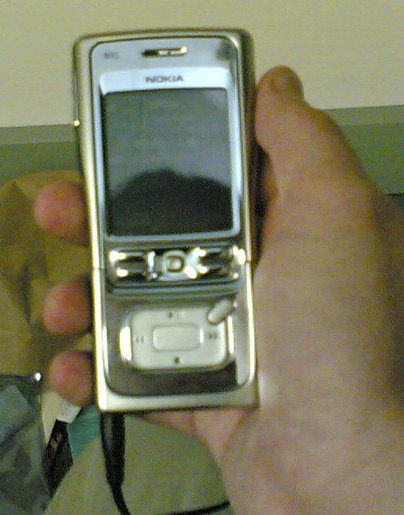
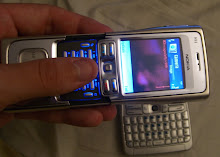
The new phone!


4GB IBM microdrive
A whole bunch of ram
mp3 player
gsm 900 1800 1900 umts 2100 bluetooth wifi
167grams Posted by Picasa

After!

  Posted by Picasa

Before...

  Posted by Picasa

Sunday, August 06, 2006

200 Switches representing ~16000 ethernet ports...

Just arrived... Plan is to have them turned around headed for african universities in a couple weeks.
  Posted by Picasa

New Laptop


08042006
Originally uploaded by joelja.


1.66ghz core duo
2GB of ram
120GB drive
radeon x1400 with 128MB
802.11a/b/g and bluetooth 2.0

Friday, August 04, 2006

Well ok... (pager)


maybe virtual dimension will be better:

http://virt-dimension.sourceforge.net/

The overall windows experience. Week 2 on the new box.

This is a the first time I've used a windows machine as my primary box in a long time, (we have one for gaming at home, and I have a mostly unused desktop at work...

There's a couple things that are nice:


  1. Suspend and resume works, though this laptop has 2GB of ram and it suspends really slowly.

  2. It's nice to have media on all websites play back for a change.

  3. More open-source software seems to have been ported to windows and works well. GIMP, gnu dia, GAIM, slypheed, clamav etc.

  4. bluetooth is easy to setup, but it doen't really work all that well which is slightly disapointing. linux and bluez is rather harder but it's rock solid once you get it working.


Some things are not so good though...


  1. You still have to restart way too often... Either because you've installed some piece of software or a driver that requires it or because for whatever reason some piece of software generally part of the UI has become unstable.

  2. Sometimes software just mysteriously fails to install, or after installing doesn't work. There's muc more diagnostics for this in linux systems then there is in windows boxen. When you uninstall someting on a rpm package mangement based system you can be pretty sure it's all gone. that's way more ambiguous on windows.

  3. The initial load on this acer was horrible... some things I had no trouble installing on the Dell, Just refused to work properly (windowblinds). The system came with software to backup the image on the disk, but didn't come with installation media. reinstalling the os using an oem disk and the key on the bottom of the laptop solved that for the most part except some if the acer provided drivers (ati catalyst control panel) refused to properly install. not all the software (the cd burning stuff or the dvd player) were avaialble for download. norton antivirus which came bundled with it is junk and is now gone.

  4. Drivers for some of my older usb hardware (usb serial adapter) are now rather hard to find... these things for the most part just work on linux.

  5. Does somebody make a virtual window manger/pager for windows that doesn't crash, lose windows, end up with the same window on multiple pages unitentionally and fits someplace in the start-bar? cool-desk had lots of promise but it has all those problems. The windows powertools one install but now appear not to work (that problem again) and I remeber not liking it anyway. it's shouldn't be that hard a problem to solve.

Parallels for windows, revisted...

Has actually ended up being fairly unusable for me...

The fc5 instance routinely stops responding to me during normal use. Initially I thought this has something to do with the xserver but it happens if I start a vnc server then point the windows vnc-client at that over the virtual network interface as well.

Virtualization does not survive the windows suspend and resume cycle. Normally if you suspend the parallels vm on it's own it will resume properly after you wake, or in fact after you restart the laptop, but if you leave it running, it'll fail when the machine resumes either that or you may get a BSOD.

VMware player would happily survive a suspend and resume cycle on linux (at least with a freebsd guest). Though suspend and resume for the linux laptop (the dell inspiron 6000) wasn't all that reliable to begin with.

Tuesday, August 01, 2006

Dirty boy, redux.


07302006(001)
Originally uploaded by joelja.

dumpster full of closed cell foam.

Wow!


07302006(002)
Originally uploaded by joelja.

Is that box big enough...

Don't try assembling a chatsworth megaframe in your office.